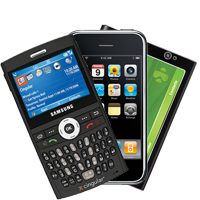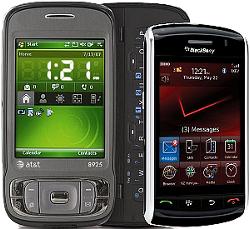
Blackberry vs. iPhone

Written by Zealus on August 18, 2008 – 1:05 pm -

RIM’s BlackBerry is the leader in the smartphone market today, but now that the iPhone 3G has become more attractive to both consumers and the enterprise, RIM needs to stop the iPhone onslaught as soon as possible.

There’s no argument about it - devices designed as business tools will work out better for business tasks then devices designed as status symbol. From my personal standpoint - the iPhone isn’t good or bad or evil - it’s just useless.

When you are indeed a business professional your tasks include sending and receiving e-mails, checking and updating schedules, going to meetings, taking notes and, possibly, sharing your thoughts with peers. While passive parts can easily be done with any device, including iPhone, the active parts, that include typing or some other kind of active interacting the Blackberry is ahead by leaps and bounds.

Instead of thoroughly analyzing let’s do the funny thing - let’s look at the way both devices are being positioned in minds of customers. In other words - what do we know about these devices from advertisings, promotions and other PR stunts.

Anything you know about the iPhone is related to entertainment - you can watch YouTube, listen to music, browse the web, run cool Apps. Any poster you can find projects iPhone as a fun cool gadget that will bring envy to your peers eventually making them go through same artificially-induced demand curve that ends with 10 days wait for shiny new thing.

Whatever you see or hear about Blackberry has nothing fancy, cool or entertaining about it. The device is much bulkier, calling it pretty would be an overstatement and it has that vibe about it that you’re connected to your job 24×7. Everything you know about Blackberry is about getting more productive on the go.

Surprised? Did’t think so. The distinct difference between the entertainment center posing as occasional work desk and work power horse occasionally serving as a music player cannot be missed.

So what’s in it for small business? Whether you need to project your status image among collegues and peers - go with the iPhone, you won’t miss. If you need to get the job done - the Blackberry should be your answer.

P.S. Neccessary disclosure: I own and alternate between Samsung Blackjack (creature very similar to Blackberry) and AT&T Tilt.

Popularity: 14%

Tags: , , , , ,

Related posts


Tags: , , , , ,
Posted in cellular | No Comments »

Gadgets As A Conversation Pieces

Written by Zealus on February 6, 2008 – 12:19 pm -

Gadgets as a conversation pieces - Small Business Marketing and Web Design blog There are couple of gadgets that I possess that make great conversation pieces. One is Lenovo X61p laptop, which I reviewed earlier, another one is famous HTC Advantage 7501. Both, as it turns out, attract a lot of curiosity.

When I am working (or blogging) at the local Starbucks with my X61 a lot of people pay attention to the small yet strong laptop figure. Most of people I see around me use large, bulky, flashy laptop, like Dell, Toshiba or Apple, with 15 and 17 inch screens. X61p that I own has only 12.1 inches and resolution of 1024×768. However, it doesn’t look like cheap plastic hardware, more like a business tool for a person on the go. It also attracts looks because it’s different from other laptops around, so it naturally stands out. And any conversation it starts can be turned into potential sales pitch. After all - it isn’t hard to predict the sequence: “Nice laptop you got there! - Thank you, I travel a lot, so I have to have as light load as possible. - Oh, wow, what do you do? - Web design, we create web sites. Our customers are all over US, so I get to travel a lot sometimes.” - and so on.

The HTC Advantage (follow this link if you want to see where I bought it and don’t fall for any price above a grand) is very unique. It doesn’t look like Amazon’s Kindle (another great conversation piece, actually), but I do read books on a subway using HTC Advantage, so people become naturally interested. Again, the sequence is very much the same. Although last time I got asked, the lady pulled out her Blackberry and started researching Amazon for HTC Advantage right there and then.

Generally speaking there is a lot of stereotype bashing going on right here. Being equipped with so many advanced gadgets makes me look like a geek. On the other hand, these gadgets help me make more contacts with people I would otherwise miss. Not a geeky behavior at all.

Popularity: 56%

Tags: , , , , , , , , , , ,

Related posts


Tags: , , , , , , , , , , ,
Posted in technology | Comments Off

HTC Advantage 7501 has arrived

Written by Zealus on September 17, 2007 – 3:14 pm -

HTC Advantage 7501 with Windows Mobile 6So, the first impressions.
The device was ordered August 17 from Amazon, half a month after I have discovered the existence of HTC Advantage (aka Athena) 7501, but arrived almost 3 weeks later, last Friday. While unpacking I came to a realization that the device is just a little too big and a little too heavy. It’s of a size of a small pocketbook, yet I don’t really have any pockets for it (except with winter coming - maybe somewhere in winter jacket). So I end up carrying the unit either in hands or in my backpack, which isn’t really a good idea.

First off - the phone capabilities of this HTC Advantage 7501. Let me go ahead and make a bold statement. Anyone talking with this thing next to his or her head looks dumber then a monkey talking through banana. At least monkey has a reason for that, while no sane human being has no reason to talk into that big black box with shiny screen. Throughout the weekend I used speakerphone (it’s quite decent, try it). First thing I did when arrived at my office - paired my Bluetooth headset with Advantage.

Snap-on magnetic keyboard is a real blessing if you need to type URLs, SMS, short e-mail or use instant messenger, but don’t count on it for lengthy letters. It’s just a little larger then regular thumb keypad, and smaller then any decent size keyboard. I was, however, able to get used to it after couple of days. Keyboard acts as a screen protection when Advantage is stowed away, as a very firm stand (see picture) but absolutely gets in a way when using PDA in a portrait mode. HTC supplies the device with nice leather cover that holds the 7501 by special latches and the keyboard just snaps to magnets hidden in a flap. Overall, if you can get to any horizontal surface - HTC Advantage is a great tool, that will allow you to type away whatever you need.

Not quite so if you don’t have such surface. As a part of my daily routine I spend around 1 hour in NYC subway. Good thing I almost always get a seat. Bad thing that MTA didn’t get tables by them. Reading eBooks from large, 5-inch screen is much like reading a real book. Except for the sun, since the 7501’s screen is almost invisible in bright sunlight. Note to self: I think I saw a protective self-adhesive cover for screen, must try that tomorrow. Writing or typing while holding the devide in the air is very complicated, since the 7501 is much larger then any other PDA, keyboard isn’t in a right place and if you decide to go with on-screen tapping or writing you must hold the device in a proper fashion which isn’t an easy thing to do. Currently I am giving a try to Spb Full Screen Keyboard, but found myself adapting to use attachable one more and more often. After all, it is a real keyboard.

The built-in GPS wasn’t very useful last Saturday, when I was a bit lost while driving to Renessanse Faire. While passengers in the car were very supportive and understanding about my geeky need to figure out how to make Advantage show us right directions it still worked pretty slow, probably because I used Google Maps for Mobile instead of pre-installed, subscription-based (and for some reason non-functioning) TeleNav. We used Garmin Nuvi 360 in the meantime, to get to the place.

Video playback was a major disappointment. DivX programs encoded to 512×384 pixels with 24 fps were a snail-paced slide show (I used Core player, since Windows Media player just won’t accept the DivX video at all). For comparison - the previous HTC that I owned (BlueAngel) was able to play the files flawlessly (if only dragged a little during fast-action sequences, but I don’t watch movies on PDA at all, so it’s okay). However, when I re-encoded files using Pocket DivX Encoder - everything just started flying (and files took much less space - around 100MB for PPC video as opposed to 600MB for source). Now 8GB microdrive starts looking real spacious.

Concluding the first impressions I should add that charging via USB cable yields weird results - battery indicators showed anything they wanted and not the real status of things. Another dis-Advantage is that device is using miniSD memory cards, instead of full size SD (I believe there was plenty of space for it) or microSD.

Knowing how lazy I am I probably would not post a full hands-on review, but I will try to get pictures of line-up of all my devices - Samsung i607, Verizon VX6600 (HTC BlueAngel), HTC Advantage and maybe even iPhone. Stay tuned.

Popularity: 66%

Tags: , , , , , , , , , , ,

Related posts


Tags: , , , , , , , , , , ,
Posted in cellular | Comments Off