Customizing Your Smart Phone – Part 1

Written by Zealus on February 23, 2009 – 10:07 pm -

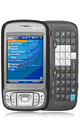
Customizing your smart phone, when it comes to HTC hardware, requires three major steps. I’ll go over all three briefly, then elaborate more for those who’d like to get on board. Something like a disclaimer – I will deliberately simplify things and try NOT to use special lingo – exactly for the purpose of explaining things as simple as possible. Maybe even simpler.

Now, when talking about customizing your phone, I don’t mean installing some new shiny app or changing couple of colors and fonts here and there. I am talking about installing an improved OS, upgrading software that powers your cell phone radio and GPS, drastically changing the way you use that phone.

In case you already scared – well, to a certain point you should be. It’s a bit convoluted procedure, requiring you if not reading through dozens and dozens of pages of nerd talk at least being able to follow instructions. Outlined in nerd talk. But we’ll get there later.

Since most of the world employs various derivatives of GSM networks (read: phones with SIM cards), that’s what we will be looking at. After all, you would enjoy being able to take your smart phone on your next trip to Europe, wouldn’t you?

Step 1: Unlocking your smart phone. Smart phones are smart, they are a miniature computers with their operating systems and all. So in order for you to be able to install that new operating system you will need to unlock your phone. SIM unlock (as in – being able to use other company’s SIM card in your phone) is a minor benefit of the first step. By unlocking your phone you become the only real owner of your hardware. Unlike the following two steps, this step is required and will only need to be performed once.

Step 2: Upgrading software for the radio in your cell phone. While optional, this is the step that would give you the most benefit. All else aside, this is the real reason anyone would really NEED to upgrade their phone. As an example – my AT&T Tilt, bought just a little over a year ago, shipped with radio software four generations behind current! Of course AT&T, being busy with those iPhones and all, forgot to issue a single update to that software. However, after upgrading a software to the latest available, I was able to almost eliminate dropped calls in quite a few spots and improved overall quality of calls. Less frustration and happier clients are extra.

Step 3: Upgrading OS and software on your phone. As does any computer from any big-name manufacturer, cell phones arrive with loads of bloatware. Stuff you don’t really need or use. However, unlike computers, cell phones are a bit different in nature, and this software is put into permanent memory of the cell phone, so you just can’t uninstall it! So instead of being occupied with something useful, like a modern browser, nice organizer or an elaborate mind-mapping software, the cell phone memory is occupied with useless junk that slows everything down.

That being said, here’s a real tangible business benefit for any business owner – upgrade your smart phone, keep more money in your business, instead of investing them into yet another piece of hardware that “almost does it right, but not really“. Protect the nature. Reuse. Rethink. After all, it’s a smart phone, why not being smart about how to use it?


Tags: , , , , , , ,
Posted in cellular, technology | Comments Off

Customized Gadgets Get Done More For Less

Written by Zealus on February 23, 2009 – 2:29 pm -

HTC Kaiser aka AT&T Tilt With all the latest craze about smart phones, led by Apple’s iPhone, most consumers are sucked into a never ending craze of updating, switching, getting new ones and so on. Given the tightening budgets it may not be the best way to save. On the other hand, mounting pressure to get more things done can be devastating if your gadgets aren’t giving you the best they can.

What’s the solution? As always, squeezing the maximum juice out of existing hardware with new software.

This passed weekend I was busy doing my homework. Currenly I mostly use my AT&T Tilt, and couple of problems that’s been bugging me is lack of normal mobile browser (SkyFire just doesn’t cut it) and poor reception. My point was that without a decent reception any browser is useless. Thanks to the fact that I am deeply in love with HTC devices since my first smartphone (Verizon XV6600 aka Blue Angel), I keep purchasing devices backed by the same manufacturer (BlackJack being the only exclusion because I wanted Tilt and it wasn’t on the market yet when I switched providers). There’s a great resource for anyone looking to enhance their HTC manufactured device, called XDA developers forum. However, as with any geek-powered resource, there’s plenty of technical information in which any ordinary user would just drown.

In a next few articles, titled “Customizing Your Smart Phone” I will try to explain the process and technology behind it in simple terms, so that us, ordinary business users, would understand and make use of the technology long available but less perused.


Tags: , , ,
Posted in cellular, technology | 1 Comment »

5 Reasons NOT To Own A Smartphone

Written by Zealus on January 19, 2009 – 3:21 pm -

5 reasons not to own a smartphone - old phone pictureTo keep a balanced approach along with the previous article here’s five reasons why you shouldn’t own a smartphone.

1. Too complicated, wasting too much time

A lot of people are avoiding smart phones (and other complicated pieces of technology) simply because they’re afraid they will not be able to figure them out. They are certainly right, these phones are complicated, requiring time and patience to understand and get used to the process. This could be time consuming and some people just aren’t comfortable with this.

2. You look too busy when typing away, people don’t think you’re paying attention

We’re all part of our social environment. If you spend most of your time looking at your Blackberry than you are making an eye contact, people would stop any kind of contacts with you at all. Knowing that some avoid using smartphones to prevent loosing other people’s attention.

3. You prefer your smartphone to real world face-to-face contact

This is somewhat similar with the previous reason, but in fact – just the opposite. Why would you waste time on sending e-mails back and forth if you could just meet for 15 minutes and solve all the issues. In fact, from my own experience, a 30 minute meeting can resolve enough issues to save you about 6 – 8 hours of writing e-mails.

5 reasons not to own a smartphone - old phone picture4. Battery life makes you go crazy

Smartphones are hungry beasts. If you used to recharging your phone once a week (light use) or once every three-four days (heavy use) – forget it. Almost every smartphone even with moderate use requires recharging every night. It could hold its juice for over 24 hours, of course, but would you want to be stuck in the boring meeting next day and don’t have enough power to check your e-mail while you’re at it?

5. Your data gets lost with your phone

That’s the most dreaded thing of all. We tend to sidestep required security locks in the names of efficiency and easiness of use. Just imagine if all the data you have on your phone is in some dirty sticky hands. To avoid that altogether is alone a good reason not to have a smart phone at all.


Tags: , , , ,
Posted in cellular, technology | 2 Comments »